
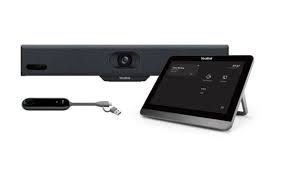

The Yealink A30-A10 is transforming how businesses conduct meetings. At a time when video conferencing is more essential than ever, this all-in-one collaboration bar provides a smart solution tailored for small to medium-sized meeting rooms. Engineered with cutting-edge AI, dual cameras, and plug-and-play capabilities, the A30-A10 brings crystal-clear visuals and seamless audio to the forefront.
Whether you’re upgrading from basic webcams or trying to streamline multiple devices into one, the Yealink A30-A10 simplifies and enhances your conferencing environment. In this guide, brought to you by online electronic shop, we’ll explore everything you need to know—from setup to features and use cases.
Why the Yealink A30-A10 Is Ideal for Modern Offices
Built-In Camera and Audio Excellence
The Yealink A30-A10 includes dual 8MP cameras with AI tracking capabilities that automatically frame active speakers or groups. Unlike basic webcams, this unit ensures all participants are visible and heard clearly.
Key Audio/Visual Highlights:
- Wide 120° field of view
- Auto framing & speaker tracking
- 8 MEMS microphone array
- Noise-proof technology
Compatibility with Leading Video Platforms
This setup supports native integration with:
- Microsoft Teams
- Zoom Rooms
- Google Meet
- BlueJeans
No need for additional PCs or complex installations—just plug it in and go.
Unboxing the Yealink A30-A10
Here’s what you’ll find inside the box:
- Yealink MeetingBar A30 unit
- Power adapter
- Mounting bracket
- HDMI cable
- Ethernet cable
- Remote control
- Quick Start Guide
Everything’s packaged neatly, and clearly labeled, so you’re up and running in minutes.
Installation and Configuration: A Step-by-Step Guide
Hardware Setup
- Mount the Yealink A30-A10 on the wall or place it on a table.
- Connect it to the display screen using the HDMI cable.
- Plug in the power and connect to Ethernet (or use Wi-Fi).
- Use the remote control or touch panel (optional) for setup.
Software Setup
- Choose your preferred video platform (Zoom, Teams, etc.)
- Sign in using your admin credentials.
- Test camera and mic functionality.
- Adjust settings like camera framing and noise suppression.
Key Features of the Yealink A30-A10
Dual-Camera System
Capture meetings from multiple angles with a powerful dual-camera system that ensures everyone is seen.
AI Noise Cancellation
Eliminate background noise and distractions with advanced AI-powered noise-proof technology—ideal for busy work environments.
Wireless Content Sharing
With built-in Wi-Fi and Bluetooth, you can share content wirelessly from your laptop or mobile device using Yealink’s WPP30 wireless presentation pod (optional accessory).
Benefits of Using Yealink A30-A10
Enhanced Collaboration
Hold more productive meetings with intuitive controls, auto-tracking, and clear visual/auditory quality.
Seamless Connectivity
Whether you’re using wired Ethernet or Wi-Fi, the Yealink A30-A10 provides stable, lag-free connections every time.
Smart Meeting Technology
AI-enhanced features like auto speaker detection, voice recognition, and intelligent switching keep your meetings dynamic and engaging.
Yealink A30-A10 vs Other Video Bars
Compared to Yealink A20-010
| Feature | A30-A10 | A20-010 |
|---|---|---|
| Cameras | Dual 8MP | Single camera |
| Microphones | 8 MEMS | 5 MEMS |
| Ideal Room Size | Medium | Small |
| Price | Higher | Lower |
🆚 Compared to Other Brands
Brands like Logitech and Poly offer alternatives, but few match Yealink’s native integration capabilities and AI-driven enhancements.
Integration with Yealink Ecosystem
The Yealink A30-A10 is compatible with:
- Yealink Touch Panels (CTP18)
- Yealink RoomPanel for scheduling
- Yealink Meeting Management Suite
This ecosystem approach lets IT teams centrally manage devices while enhancing the user experience.
Use Cases: Who Should Use Yealink A30-A10?
🏢 Small Meeting Rooms
Perfectly sized for rooms up to 7 people.
👨💼 Huddle Spaces
Ideal for impromptu collaboration sessions with minimal tech fuss.
🌍 Remote and Hybrid Teams
Bridge the gap between in-office and remote employees with high-quality video/audio interaction.
Top Tips to Maximize Your Yealink A30-A10 Experience
- Update firmware regularly
- Mount the bar at eye-level for the best camera angle
- Pair with a 4K display for enhanced visuals
- Use Yealink’s mobile app for remote control
- Train users on basic functions to reduce IT support needs
Real-World User Experiences and Testimonials
“The Yealink A30-A10 has completely changed how our teams collaborate. No more dropped calls or blurry video!”
— John D., IT Manager, Marketing Firm
“Easy to install, easy to use. The best part? It just works.”
— Sarah M., Office Administrator, Healthcare Company
FAQs
1. Does the Yealink A30-A10 work with Zoom and Microsoft Teams?
Yes, it offers native support for both platforms.
2. What room size is the Yealink A30-A10 suitable for?
It’s optimized for small to medium-sized rooms (up to 7 people).
3. Can I use it without a PC?
Yes. It’s an all-in-one device with built-in Android OS.
4. Does it support wireless content sharing?
Yes, via Miracast, AirPlay, and the optional WPP30 wireless pod.
5. What is the difference between A30-A10 and A20-010?
A30-A10 includes dual cameras and more powerful microphones, making it better for medium rooms.
6. Where can I buy the Yealink A30-A10?
Visit the official Yealink website or trusted resellers like online electronic shop for the best deals.
Conclusion
The Yealink A30-A10 is more than just a video bar—it’s a smart conferencing solution that brings intelligence, clarity, and efficiency to every meeting. For businesses embracing the hybrid work model, it delivers reliable performance, easy installation, and seamless compatibility with top collaboration platforms.
Don’t just upgrade your tech—transform your meeting experience with the Yealink A30-A10, proudly available at online electronic shop.